

For a luxury catering client, I worked on streamlining the process from the first enquiry to the event-team handoff. The challenge was keeping the conversation, event requirements, quotation and next action connected as the work moved between people.
I wanted a demo that someone could understand without sitting through a long walkthrough. I used video-shotcraft to build a short film around the process: what arrives, what AI can prepare, what a person needs to review and who takes over next.
For this public version, I used fictional records in an anonymised copy of the interface. The client’s identity and private information stay out of the film. It demonstrates the workflow, rather than documenting live integrations or measured business results.
Read the video transcript and visual description
- 00:00 to 00:10
Luxury service. Behind-the-scenes chaos? An illustrative event photograph gives way to fictional email, spreadsheet, quotation and message fragments. Enquiries are scattered, details are copied and the guest count changes. Music plays without spoken narration.
- 00:10 to 00:15
Bring enquiries into one workflow. An anonymised enquiry workspace shows email and messaging in one shared record.
- 00:15 to 00:20
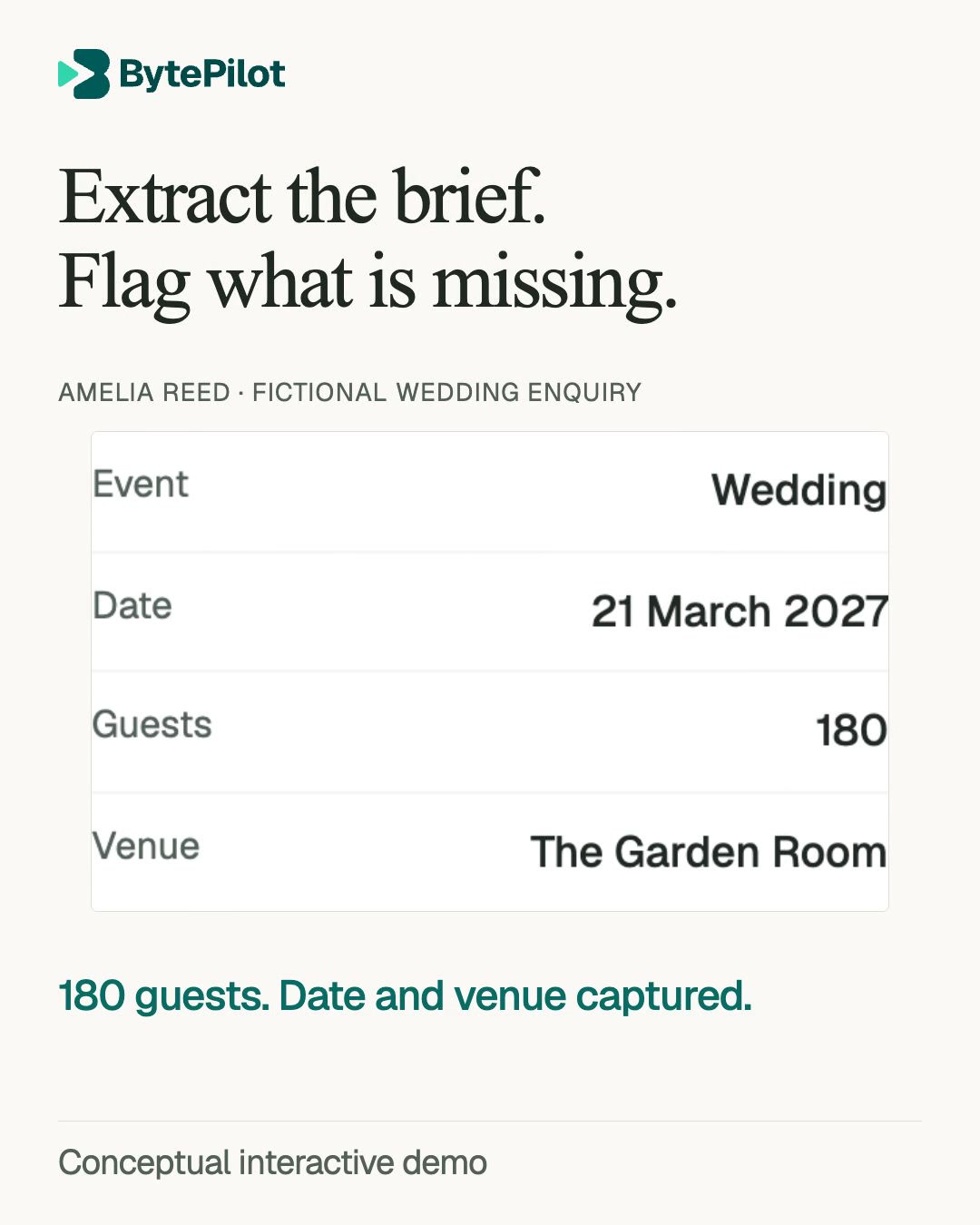
Extract the brief. Flag what is missing. The fictional enquiry records 180 guests, a date and a venue. Budget, timing and venue access still need review.
- 00:20 to 00:25
Prepare a personal reply. A draft is prepared for staff review before sending. AI suggestions and connections are simulated.
- 00:25 to 00:33
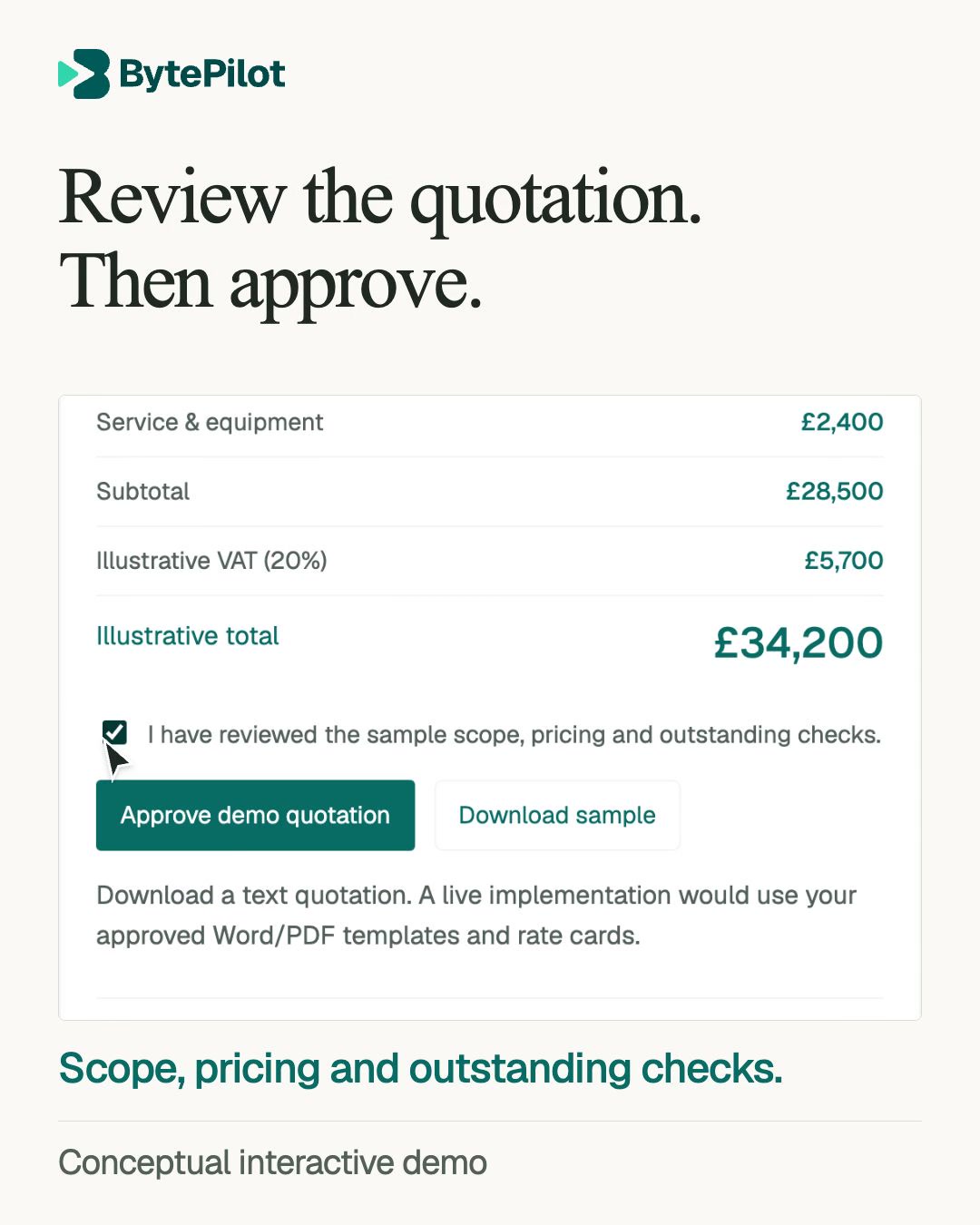
AI prepares. Your team decides. The quotation is shown with scope, pricing and checks. A staff review precedes demo approval.
- 00:33 to 00:39
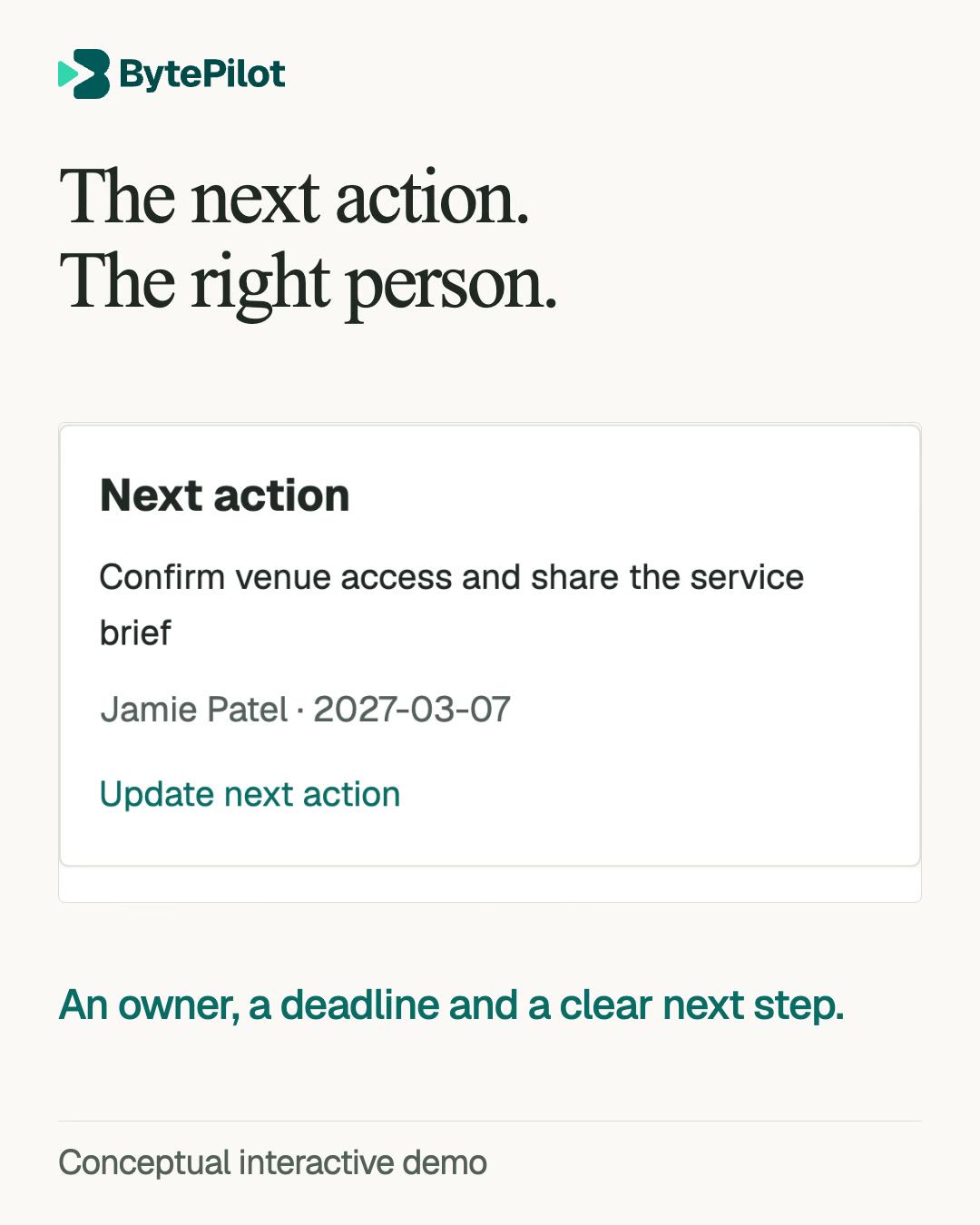
The next action. The right person. Sales hands over to Events with a named owner, deadline and next step.
- 00:39 to 00:45
Guest numbers change from 180 to 195. Affected teams review the change, and pending changes remain visible.
- 00:45 to 00:55
A clear view of the work ahead: priorities, ownership and event progress. Less admin. Better coordination. More time for exceptional experiences. These are the workflow's intended benefits, not measured client results.
- 00:55 to 01:00
Your service is exceptional. Your operations should be too. BytePilot. bytepilot.co. The conceptual interactive demo label remains visible.
The process I wanted to make clearer
In catering and hospitality, a small change can create work across several teams. The latest guest count might be in an email while the quotation still shows the old number. Someone has to find the right version, check what it affects and tell the people preparing the event. That is the operational chaos I wanted the demo to address.
I organised the demo around one connected record. The conversation supplies the context. The brief makes requirements visible. The quotation has an explicit review step. The handoff includes an owner and a next action, so a colleague can see what they are taking over.
The point I wanted to show: AI prepares the work. Your team stays responsible for the decision.
What BytePilot can build for your operations
BytePilot provides data integration and reporting, AI-assisted operations and workflow automation. We design and build around the way your team works, starting with the records, decisions and handoffs that cause repeated chasing. For catering and hospitality, the enquiry-to-event process gives those services a practical starting point.
Data: connect your records and reporting
We bring information from existing systems together, keep it consistent and turn it into usable reports. In a catering workflow, that could mean linking the enquiry, current event brief and quotation so the team can check the latest requirements in one place. The aim is to reduce copying, conflicting versions and time spent reconstructing the conversation.
AI: prepare the work for your team to review
We build AI assistance into daily workflows to organise information, draft responses and support decisions. For an event enquiry, that could mean preparing a brief, flagging missing details and drafting a reply. Your team reviews the output and approves commitments such as scope and price. The film makes that review step visible.
Automation: move work between people and tools
We automate recurring steps across your tools so a handoff does not depend on someone remembering to send another message. An approved quotation could create an event-team task with an owner and deadline. A guest-count change could prompt the affected departments to review it. We agree the triggers, approval rules and exception handling with your team before implementation.
Explore BytePilot’s Data, AI and Automation services. We can start with one process, identify where information gets lost and scope the connections and controls needed to improve it.
I used video-shotcraft to turn the workflow into a story
I used the open-source video-shotcraft repository for its production workflow, shot recipes and editable Remotion project. I chose the autonomous creation route with a defined brief and storyboard. The direction was a bright, restrained product demo that matched BytePilot’s visual style.
I did not need every feature on screen. I needed a sequence that an owner or operations lead could follow: scattered enquiries, a useful brief, a prepared reply, human approval, then a clear handoff. The software work gave me the process. The video made that process easier to explain.
The brief that kept the film focused
Create a 60-second demo for luxury catering and hospitality operations. Show enquiries becoming a brief, a draft reply, a reviewed quotation and an event-team handoff. Use real captures of the anonymised demo. Keep staff approval visible, use readable portrait framing and do not invent performance results.
This is a reusable summary of the production brief. The final format was 1080 × 1350 pixels at 30 frames per second, with on-screen captions and no voiceover.
I captured the states that mattered
I used browser captures of the working demo, including the enquiry, extracted requirements, missing information, reply composer and quotation. I also captured the review checkbox, the approved state and the event handoff. That gave each shot a real interface state to show.
The public production copy used a fictional wedding enquiry for 180 guests. It also included a change to 195 guests so I could show how affected departments review a revision. I kept the original client interface separate from this anonymised filming copy.
Full-page captures established the workspace. Close-ups made the brief, approval and ownership readable. I kept the important interface details in the frame and used short captions to explain the action, rather than asking viewers to read an entire dashboard.
How I built the approval shot
The approval sequence is the centre of the film. At 25 seconds, the interface gives way to a title: “AI prepares. Your team decides.” At 27 seconds, the quotation returns. The viewer sees the review step before the approved state appears.
For the title, I adapted video-shotcraft’s paper-title-card reference. I kept the staggered word entrance and settling motion, then applied BytePilot’s serif type, pearl background and teal emphasis. The movement leads into a readable hold.
The following shot uses the captured quotation states. A restrained move brings the review controls into view, and a cursor marks the interaction. The approved result is shown only after the review action. I wanted the order of those steps to remain obvious.
This is the practical recipe I would reuse for a single video shot: choose one action, capture its starting and ending states, animate the transition and leave time to inspect the result. For a process demo, the relationship between those states matters more than a complicated effect.
The film is rendered with Remotion, which defines video frames using React components. That lets me revise the timing, crop or caption and render the sequence again while keeping the project editable.
I gave each part of the minute one job
| Time | What the viewer sees | Why it is there |
|---|---|---|
| 00:00 to 00:10 | Scattered enquiries and changing details | Establish the coordination problem |
| 00:10 to 00:25 | Shared enquiry, brief and draft reply | Show the preparation work |
| 00:25 to 00:33 | Human review and quotation approval | Make the decision boundary explicit |
| 00:33 to 00:45 | Owner, next action and guest-count change | Explain the event-team handoff |
| 00:45 to 01:00 | Operational overview and BytePilot close | Leave the viewer with the purpose and next step |
The opening event image is illustrative, not a photograph of the client or their venue. After the opening, the interface carries the story. I kept the music understated and used sparse click sounds around the draft and approval actions.
I also kept the conceptual-demo label visible. The film shows how the workflow is intended to work, while the fictional records let me demonstrate details without exposing the client’s information.
What I changed during review
The first framing did not make every important detail clear. A sticky header covered the owner in one shot. Another shot tried to show too much of the overview at once. Department panels also needed more room so their review state remained visible.
I recaptured the owner field, adjusted the department views and made the overview’s purpose explicit: what needs attention, who owns it and what happens next. I reviewed frames from the exported MP4 at small-screen size, not just the editor preview.
The final package includes the editable project, captions, source records and a version without background music. Those are useful when the workflow changes or when I need to present the same demo in a different setting.
Start with one workflow at BytePilot
A useful demo gives the team something concrete to question. Does this brief contain what Events needs? Is the latest guest count visible? Can a colleague see who owns the next step without sending another message? Those checks tell us whether the proposed workflow addresses the daily chasing.
For a catering or hospitality team, the intended benefit is less time reconciling versions and more attention on the event itself. That starts with one difficult handoff, such as an enquiry becoming a proposal or a late change reaching the people preparing the service.
BytePilot can take that workflow from process mapping into implementation. We identify the systems involved, define the data connections and build the agreed AI assistance and automation. A focused demo gives your team a way to review the proposed behaviour before a wider rollout.
Bring us one process that creates repeated chasing, the tools your team uses and the point where the handoff breaks. We can discuss what to connect, what to automate and where human approval belongs. Talk to BytePilot about your operations.
Sources and evidence
Sources and evidence
- video-shotcraft repositoryProduction workflow, shot recipes and editable video tooling used for the demo.
- Paper title cardThe reference adapted for the human-approval title.
- Remotion fundamentalsFrame-based video composition with React.
- Video and image creditsMusic, click sound and illustrative opening-image provenance for this film.
FAQ
A few practical questions
Which repository did you use to create the video?
I used Vincentwei1021/video-shotcraft for its production workflow, shot recipes and Remotion-based editing project. The approval title adapts its paper-title-card reference, while the interface scenes use actual captures of the anonymised demo.
Does the video contain real client information?
No. The public film uses fictional people and event details in an anonymised conceptual demo. AI suggestions and connections are simulated. The opening event image is illustrative.
How can I create a similar workflow shot?
Pick one action, prepare a demo with safe sample data, capture the relevant states and choose a matching shot recipe. Apply your product’s visual style, leave a readable hold on the result and check the exported video on a small screen.
How does BytePilot help reduce chaos in catering and hospitality operations?
BytePilot connects data from existing systems, uses AI to help organise information and prepare drafts, and automates recurring handoffs. For a catering workflow, that could mean keeping the latest event requirements together, preparing a reply for review and assigning the next task after approval. The work starts by mapping the team's process and agreeing where people must check or approve an action.